










TGD Tuner rel. 2.2.9
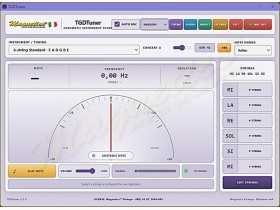
TGDTuner Professional
TGDTuner Professional is a high-precision chromatic tuner developed for musicians, guitar technicians, luthiers, recording studios and music teachers who require accurate, stable and responsive tuning.
Designed specifically for Microsoft Windows, TGDTuner combines a clear analog-style display with a modern digital pitch-detection system. It provides reliable real-time tuning through the computer’s built-in microphone, an external microphone or a compatible USB audio interface.
Its compact and intuitive interface makes TGDTuner suitable for quick everyday tuning as well as continuous professional use in workshops, rehearsal rooms, music schools and recording studios.
Main Features
- Professional real-time chromatic tuner
- High-precision pitch detection
- Automatic note recognition
- Smooth analog-style needle movement
- Clear cent-deviation display
- Adjustable A4 reference frequency
- Built-in reference-tone generator
- Fast and stable response
- Low-latency audio analysis
- Wide frequency-detection range
- Support for low-frequency and extended-range instruments
- Selectable audio input device
- Compatible with built-in and external microphones
- Compatible with USB audio interfaces
- Compact and easy-to-use interface
- Low CPU and memory usage
- Optimized for Windows 10 and Windows 11
Supported Instruments
TGDTuner can be used with virtually any pitched musical instrument, including:
- Electric guitars
- Acoustic guitars
- Classical guitars
- 7-string and 8-string guitars
- 4-string, 5-string and 6-string basses
- Ukuleles
- Mandolins
- Banjos
- Violins
- Violas
- Cellos
- Double basses
- Lap steel guitars
- Pedal steel guitars
- Dulcimers
- Other fretted and stringed instruments
Accurate and Immediate Tuning
TGDTuner automatically detects the incoming note, displays its frequency and clearly indicates whether the instrument is flat, sharp or correctly tuned.
The analog-style needle provides an immediate visual reference, while the cent-deviation display allows precise adjustments. Its wide detection range makes the program suitable not only for standard guitar tuning, but also for bass guitars, extended-range instruments and other low-pitched instruments.
Suitable for Professional and Home Use
TGDTuner Professional is particularly useful for:
- Professional musicians
- Guitar and bass repair workshops
- Luthiers and instrument technicians
- Recording studios
- Music schools and teachers
- Rehearsal rooms
- Home-recording environments
- Musicians who prefer a dedicated Windows application
Why Choose TGDTuner?
- Accurate and immediate note detection
- Stable and responsive needle movement
- Clear and readable interface
- Excellent response across a wide tuning range
- Suitable for low-frequency instruments
- No browser required during normal use
- No monthly subscription
- One-time license purchase
- Local installation on your Windows computer
- Designed specifically for musical-instrument tuning
System Requirements
- Microsoft Windows 10 or Windows 11
- Built-in microphone, external microphone or audio interface
- Compatible Windows audio-input device
- Available disk space for installation
- Internet connection required for purchase and download
- Valid email address required for delivery of the activation file
How to Purchase and Activate TGDTuner
- Purchase TGDTuner Professional from this product page.
- Complete the order using one of the available payment methods.
- Make sure that the email address entered during checkout is correct.
- Wait for payment confirmation.
- Download the TGDTuner self-installing program from your customer account.
- Run the downloaded installer and complete the installation.
- Wait for your personal activation file to be sent by email.
- Start TGDTuner Professional.
- Open the activation window.
- Import the personal activation file received by email.
- Confirm the activation and restart the program if requested.
No registration serial number has to be entered manually. The personal activation file already contains the information required to activate your registered copy.
Program Download
After payment has been confirmed, the TGDTuner Professional self-installing program becomes available for download through your customer account.
To download the program, log in to the store using the account associated with your order and open your order history or the relevant order details.
The program download and the personal activation file are two separate parts of the delivery process.
Personal Activation File
After the order has been verified, a personal activation file is generated specifically for the purchaser and sent separately to the email address used during checkout.
The activation file contains the customer’s registration information and must be imported into TGDTuner to enable the registered version.
The activation file is personal and must not be shared, copied, published or distributed to third parties.
Important Delivery Information
Please make sure that the email address entered during checkout is complete and correct. An incorrect email address may prevent delivery of the personal activation file.
If the activation email does not arrive, please check:
- Your spam or junk-mail folder
- The email address entered during checkout
- The payment status of the order
- Any automatic email filters
- Any restrictions imposed by your email provider
When contacting support, please include the purchaser’s name, order reference and the email address used during checkout.
License Information
- The license is issued to a single purchaser.
- The personal activation file is linked to the purchaser.
- The activation file must not be shared or distributed.
- The license does not require a recurring monthly subscription.
- Unauthorized copying or distribution of the software is prohibited.
- Unauthorized distribution of the activation file is prohibited.
Technical Support
Technical assistance is available for installation, activation and general product use.
When requesting support, please provide:
- Your Windows version
- The TGDTuner version number
- The type of microphone or audio interface used
- A clear description of the problem
- Any error message displayed by the software
- Your order reference when the request concerns activation or delivery
- The email address used during the purchase
Never publish or attach your personal activation file to public posts, comments, forums or discussion groups.
TGDTuner Professional
Professional Tuning. Maximum Precision. Designed for Musicians.
